Digital Rental Agreements & E-Signatures
Paperless contracts, e-signatures and mobile vehicle inspections — no printing, no scanning, no chasing
Hand over the car without the paperwork
A digital rental agreement in Bookrenia is made from the booking, signed on the customer's own phone, and saved on the reservation together with the pickup and drop-off inspection photos. Try the demo — every tab works.
- Signature captured in the browser — no app to install
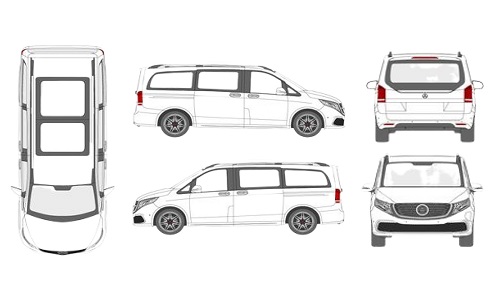
- Damage marked on a vehicle diagram at pickup and return
- Terms, deposit and insurance printed from your settings
Made from booking RS-2043. Nothing is typed twice.
- Draft
- Signed
- Closed
Paper contract vs digital agreement
- Sign at the desk
- Scan
- File in a cabinet
- Search it in a dispute
- Made from the booking
- Link by email or SMS
- Signed on the phone
- PDF saved on the reservation
The agreement workflow in 4 steps
-
1
Send the agreement
From any confirmed reservation, open the Agreements panel and click Generate. Bookrenia fills in the customer, vehicle, dates, terms and pricing. Copy the link or send it by email — no login is needed to sign.
-
2
The customer signs on any device
The customer opens the link on a phone, tablet or computer, reads the terms, checks the vehicle and price, and signs with a finger or mouse. They get a copy by email, and you are told at once.
-
3
Inspect the car at pickup
Before handing over the keys, the driver taps through the checklist — front, rear, left, right, interior and roof. They photograph any damage, record fuel and odometer, and the customer signs off. Everything is saved on the agreement.
-
4
Compare at drop-off
At return the same inspection runs again. Bookrenia shows pickup and drop-off side by side — photos, fuel and mileage — so new damage is easy to see. If a charge applies, add it to the invoice from the same screen.
What is inside every signed agreement
- 1Your brand Your logo, colours and company footer on every page.
- 2Booking & renter Pickup and drop-off place and time, renter and licence details.
- 3Vehicle & money Car, plate, fuel type, days, deposit and insurance.
- 4Your terms Taken from your own settings, not typed by hand.
- 5Inspection Vehicle diagram with damage marks, fuel, km and photos.
- 6Signature Signed by the customer, with the date and time saved.
Go completely paperless
E-Signature on Any Device
Send a unique agreement link by email or SMS. The customer opens it on a phone, tablet or desktop, reads the terms and signs with a finger or mouse. No app required.
Mobile Vehicle Inspection
The driver completes the pre-rental inspection on their phone — each body panel, fuel level, odometer reading and damage photos.
Damage Photo Documentation
Photos taken with the phone camera are timestamped and stored against the agreement — clear proof of condition at pickup and drop-off.
Pickup & Drop-Off Inspection
The same flow runs at return, and both records sit side by side so you can compare condition — essential for damage disputes.
Signed PDF Storage
Once signed, the agreement is saved as a PDF with the signature and time. Download it any time for records, customers or insurance.
Evidence Trail
The signing time, the inspection photos and the readings together give you a complete record if a damage dispute comes up after return.
How rental businesses use digital agreements
Customer signs the rental agreement from the airport while waiting for their ride to the office — arrives ready to go
Driver photographs a pre-existing scratch at pickup — no dispute at drop-off because it's timestamped in the agreement
Long-term corporate clients sign remotely without visiting the office — agreement sent and returned in minutes
Retrieve any signed agreement instantly from the reservation — no paper files, no searching through cabinets
Digital agreements — common questions
Want to see Digital Agreements in action?
We'll walk you through the full flow live — generate an agreement, send the link, sign on mobile, complete a vehicle inspection, and download the PDF — all in one call.